# Count members of the distrogroup
$members = Get-DynamicDistributionGroup -Identity “Groupname”
(Get-Recipient -RecipientPreviewFilter $members.RecipientFilter).count
Count members of dynamic distribution group
1 Reply

# Count members of the distrogroup
$members = Get-DynamicDistributionGroup -Identity “Groupname”
(Get-Recipient -RecipientPreviewFilter $members.RecipientFilter).count
Get-MoveRequest -MoveStatus Completed | Remove-MoveRequest
Get-DistributionGroup DISTROLIST |
get-distributiongroupmember |
select primarysmtpaddress |
export-csv c:templist.csv
To select a row
SHIFT-SPACE
To delete a row
CTRL- -
This script uses the Quest AD Cmdlets that can be downloaded free from Quest.
# Add the Quest commandlets if not added
if(!(Get-PSSnapin |
    Where-Object {$_.name -eq "quest.activeroles.admanagement"})) {
      ADD-PSSnapin Quest.Activeroles.ADManagement
    }

# Add Exchange 2010 commandlets (if not added)
if(!(Get-PSSnapin |
    Where-Object {$_.name -eq "Microsoft.Exchange.Management.PowerShell.E2010"})) {
      ADD-PSSnapin Microsoft.Exchange.Management.PowerShell.E2010
    }

################## SETTINGS
# Home directory for users
$homedir = "\contoso.comusers"

# Domain
$domain = "contoso.com"

# Email address to keep
$keepmail = "@contoso.com"

# The OU we are working on
$OU = "contoso.com/Users/migrated_users"
##################

# Run on all users in the defined OU
Get-QADUser -SearchRoot $OU |
foreach {
    echo "-------------------------------------------------"
    echo "Working on $($_.displayname)"
    echo "-------------------------------------------------"

    # Generate username after the 3+3 rule
    $userprincipalname = ($_.firstname.substring(0,3) + $_.lastname.substring(0,3)).tolower()
    $userprincipalname = $userprincipalname.replace("ø","o")
    $userprincipalname = $userprincipalname.replace("å","a")
    $userprincipalname = $userprincipalname.replace("æ","e")

    # Make the changes on the user account
    Set-QADUser -Identity $_ -UserPrincipalName $($userprincipalname + "@" + $domain) -SamAccountName "$($userprincipalname)" -HomeDirectory $($homedir + $userprincipalname) -HomeDrive "H:"  #-whatif

    # Check to see if the users homedirectory exists
    if ( !(Test-Path -Path "$homedir$userprincipalname" -PathType Container) ) {

         # Doesn't exist so create it.
         Write-Host "home directory doesn't exist. Creating home directory."

         # Create the directory
         New-Item -path $homedir -Name $userprincipalname -ItemType Directory
         $userDir = "$homedir$userprincipalname"

         # Modify  Permissions on homedir
         $Rights= [System.Security.AccessControl.FileSystemRights]::Read -bor [System.Security.AccessControl.FileSystemRights]::Write -bor [System.Security.AccessControl.FileSystemRights]::Modify -bor [System.Security.AccessControl.FileSystemRights]::FullControl
         $Inherit=[System.Security.AccessControl.InheritanceFlags]::ContainerInherit -bor [System.Security.AccessControl.InheritanceFlags]::ObjectInherit
         $Propogation=[System.Security.AccessControl.PropagationFlags]::None
         $Access=[System.Security.AccessControl.AccessControlType]::Allow
         $AccessRule = new-object System.Security.AccessControl.FileSystemAccessRule("$userprincipalname",$Rights,$Inherit,$Propogation,$Access)
         $ACL = Get-Acl $userDir
         $ACL.AddAccessRule($AccessRule)
         $Account = new-object system.security.principal.ntaccount($userprincipalname)
         $ACL.setowner($Account)
         $ACL.SetAccessRule($AccessRule)
         Set-Acl $userDir $ACL
    }

    # We need some sleep...
    start-sleep -sec 20

    # Now we need to clean up the users Exchange account
    Get-Mailbox -Identity $userprincipalname |

    # Loop through all the emailaddresses
    foreach {
       $a = $_.emailaddresses
       $b = $_.emailaddresses

     # Remove all but $keepmail
       foreach($e in $a)
           {
           if ($e.tostring() -notmatch $keepmail )
               { $b -= $e; }
           $_ | Set-mailbox -EmailAddressPolicyEnabled $false -emailaddresses $b -alias $userprincipalname
           }
    }

    # We had to remove the emailaddresspolicy to make changes. Let's reactivate it
    Set-mailbox -Identity $userprincipalname -EmailAddressPolicyEnabled $true
}
  Get-Mailbox -Identity $userprincipalname |

    # Loop through all the emailaddresses
    foreach {
       $a = $_.emailaddresses
       $b = $_.emailaddresses

     # Remove all but $keepmail
       foreach($e in $a)
           {
           if ($e.tostring() -notmatch $keepmail )
               { $b -= $e; }
           $_ | Set-mailbox -EmailAddressPolicyEnabled $false -emailaddresses $b -alias $userprincipalname
           }
    }

    # We had to remove the emailaddresspolicy to make changes. Let's reactivate it
    Set-mailbox -Identity $userprincipalname -EmailAddressPolicyEnabled $true
}
PowerTip of the Day, from PowerShell.com
In the upcoming PowerShell v3 which you can already download as a Beta version, using Where-Object and ForEach-Object becomes a lot simpler. No longer do you need a script block and code. This, for example, is all you need to find files larger than 1MB:
Get-ChildItem $env:windir | Where-Object Length -gt 1MB
Previously, you would have had to write:
Get-ChildItem $env:windir | Where-Object { $_.Length -gt 1MB }
When setting the -homedirectory switch on a user through Powershell the directory is not created.
Use this code to create the folder and apply the necessary ACLs:
    if ( !(Test-Path -Path "$homedir$userprincipalname" -PathType Container) ) {
         ## Doesn't exist so create it.
         Write-Host "home directory doesn't exist. Creating home directory."

         ## Create the directory
         New-Item -path $homedir -Name $userprincipalname -ItemType Directory
         $userDir = "$homedir$userprincipalname"

         ## Modify  Permissions on homedir
         $Rights= [System.Security.AccessControl.FileSystemRights]::Read -bor [System.Security.AccessControl.FileSystemRights]::Write -bor [System.Security.AccessControl.FileSystemRights]::Modify -bor [System.Security.AccessControl.FileSystemRights]::FullControl
         $Inherit=[System.Security.AccessControl.InheritanceFlags]::ContainerInherit -bor [System.Security.AccessControl.InheritanceFlags]::ObjectInherit
         $Propogation=[System.Security.AccessControl.PropagationFlags]::None
         $Access=[System.Security.AccessControl.AccessControlType]::Allow
         $AccessRule = new-object System.Security.AccessControl.FileSystemAccessRule("$userprincipalname",$Rights,$Inherit,$Propogation,$Access)
         $ACL = Get-Acl $userDir
         $ACL.AddAccessRule($AccessRule)
         $Account = new-object system.security.principal.ntaccount($userprincipalname)
         $ACL.setowner($Account)
         $ACL.SetAccessRule($AccessRule)
         Set-Acl $userDir $ACL
    }
Thank you very much for this tip Shay Levy!
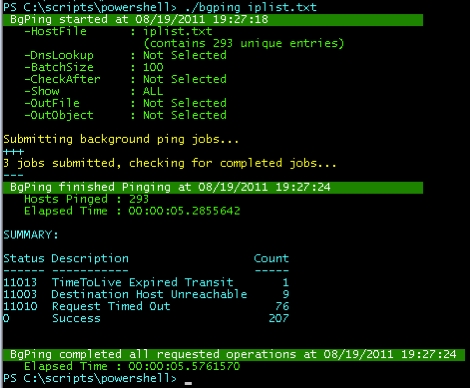
xb90 from Posh Tips has written a gorgeous masterpiece; BgPing.
Description from Posh Tips:
“BgPing.ps1 is a Background Ping Script capable of pinging enormous hosts lists in record time. You could call it a Bulk Ping Script, a Mass Ping Script, a Batch Ping Script or even a Mega Ping Script but the bottom line is: this baby will crank through a lot of IP addresses (or hostnames) very quickly.”
Connect-QADService -service ‘server.company.com’
This requires the Quest commandlets.
 SuneWorld